1 minute read
I am having a little problem with Visual Studio 2008 that only started after I had installed Office 2010. I found this interesting post on Visual Studio 2008 Locks or Freezes in ASPX from Rinat Abdullin that was a complete match to the problem I am having.
Basically VS just bings at you whenever you click anywhere as if there is a model dialog open after opening and trying to edit an aspx file.
If you get this problem then there is a simple solution, well, one that worked for me. You need to run a repair on the “Microsoft Visual Studio Web Authoring Component” that is part of Office 2007.
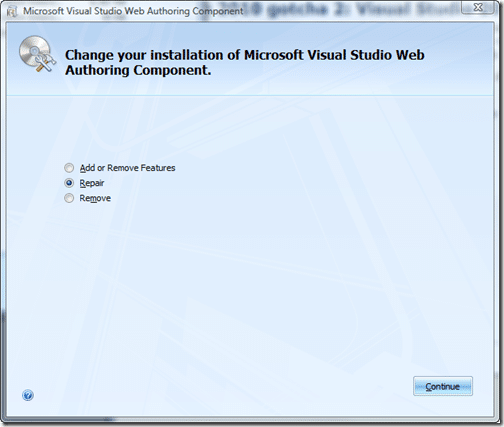
You can find the setup in the following locations:
Windows 64bit
C:Program Files (x86)Common Filesmicrosoft sharedOFFICE12Office Setup ControllerSetup.exe
Windows 32bit
C:Program FilesCommon Filesmicrosoft sharedOFFICE12Office Setup ControllerSetup.exe
My guess is that when Office 2010 is installed it has a new version of this component that has not yet been made compatible with Visual Studio 2008…
It was a frustrating couple of hours this morning to figure it out with the bulk of the time taken up with an ineffectual repair of Visual Studio 2008 SP1, ahh well, now I know…
Technorati Tags: ALM Office TFS Admin VS 2008
Subscribe to Martin's articles
Writing since 2006
Articles, usually weekly on Mondays. One click to leave.
Enjoyed this? One click, no account.
Smart Classifications
Each classification [Concepts, Categories, & Tags] was assigned using AI-powered semantic analysis and scored across relevance, depth, and alignment. Final decisions? Still human. Always traceable. Hover to see how it applies.