2 minute read
When configuring SharePoint 2013 in “Complete” mode you get a “The username is invalid. The account mist be a valid domain account” when using a local account to configure the farm…
![image_thumb[15]](/blob/articles/issue-sharepoint-2013-the-username-is-invalid-the-account-must-be-a-valid-domain-account/media/image_thumb15_thumb-1-1.png)
Figure: You need a domain to create a farm
The implication is that only Domains are supported.
Applies To
- SharePoint 2013
Findings
Out of the box SharePoint only supports “Stand-alone” mode for non domain environments, but this forces you to use SQL Server 2008 R2 Express Edition which is most cases is unacceptable.
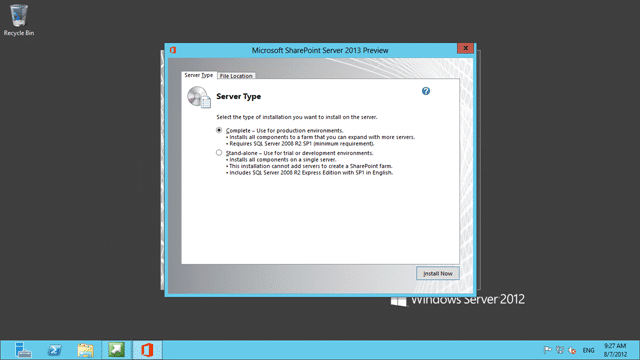
Figure: “Stand-alone” used SQL Server 2008 R2 Express Edition
The UI is designed for the happy path and you need to drop to the command line to do anything else.
Subscribe to Martin's articles
Writing since 2006
Articles, usually weekly on Mondays. One click to leave.
Solution
Use a PowerShell command to create the initial configuration of the farm with a local account:
Start the SharePoint PowerShell
Run “New-SPConfigurationDatabase” from the command line and follow the instructions
![image_thumb[16]](/blob/articles/issue-sharepoint-2013-the-username-is-invalid-the-account-must-be-a-valid-domain-account/media/image_thumb16_thumb-2-2.png)
Figure: New-SPConfigurationDatabase creates the farm for you This will create the farm and configure the necessary accounts.
Rerun the Configurtion wizard After it finishes start the Config Wizard (interactive or not) and configure your server with all components
![image_thumb[17]](media/image_thumb17_thumb-4-4.png "image_thumb[17]")Figure: Just don’t disconnect from this server farm
This works just fine with SQL Server 2012.
Did this help you?
Enjoyed this? One click, no account.
Smart Classifications
Each classification [Concepts, Categories, & Tags] was assigned using AI-powered semantic analysis and scored across relevance, depth, and alignment. Final decisions? Still human. Always traceable. Hover to see how it applies.